Blog · Deploy guides
How to deploy a Jekyll site in 2026: a Dockerfile, one command and HTTPS
You have a Jekyll site that builds on your laptop with bundle exec jekyll build, and you want it online at an address with HTTPS. On Pethost that takes a Dockerfile of 38 lines, which you copy from this page, and one command, pethost deploy. The site jekyll new makes was online in 34 seconds the first time, and in 3 seconds after a change.
- One file: a Dockerfile in two stages. Ruby 4.0 runs
bundle installandJEKYLL_ENV=production bundle exec jekyll build, then Caddy serves_site. - One command:
pethost deployin the folder that has_config.yml. 34 s the first time, 3 s for the deploy after it. - Jekyll's addresses work:
/about/answers 200,/aboutleads to it, a post answers with or without.html, and a missing page shows the site's own404.html. - The address:
https://my-site.yourname.pethost.app, with HTTPS at once. Your own domain is one DNS record. - The price: €9.99 a month for 2 vCPU, 3 GB and 30 GB, for this site and every other project you have. There is no free tier.
What you need to deploy a Jekyll site in 2026
Three things: the site, the pethost command and a Pethost account.
The site here is the one Jekyll's quickstart makes. Jekyll asks for Ruby 2.7.0 or higher; we made it with Ruby 4.0.9:
gem install jekyll bundler
jekyll new my-site
cd my-site
jekyll new writes a Gemfile with Jekyll 4.4.1, the minima theme and the jekyll-feed plugin, runs bundle install, which writes Gemfile.lock, and adds a home page, an about page, a welcome post, a 404.html and a .gitignore that leaves _site out. Keep Gemfile.lock: the build installs exactly the gems it names.
The command is one program, installed by one line. Every command it has is in the CLI's reference.
curl -fsSL https://pethost.dev/install.sh | sh      # macOS, Linux
irm https://pethost.dev/install.ps1 | iex           # Windows, in PowerShell
The account needs a plan. If you are not signed in, pethost deploy opens your browser and signs you in. If you have no plan yet, it shows you where to choose one, and waits.
Why a Jekyll site needs a Dockerfile on Pethost
A project on Pethost runs from a Dockerfile or a Compose file. For the kinds of project it knows, such as an Eleventy site, pethost deploy writes the Dockerfile itself. Jekyll is not among them, so in the folder jekyll new made, the deploy stops at the machine's answer. This is the whole screen:
$ pethost deploy
Name it [my-site]:              it will live at https://my-site.sam.pethost.app
✓ Packed 8 files, 17 KB
✓ Uploaded straight to your machine
✗ /compose.yaml: the project directory has no compose.yaml at its root: add one
  Your coding agent writes one in a minute: "Write a Dockerfile for this app".
  Then run pethost deploy again.     How Pethost runs a folder: https://pethost.dev/docs/api/#CreateProject
Nothing was created: no project, no address. Add the file below and run the same command.
The Dockerfile for a Jekyll site
Save this as Dockerfile in the folder that has _config.yml. It is the whole file:
# Jekyll builds the site into _site, and Caddy serves it.
FROM ruby:4.0 AS build
WORKDIR /site

# The gems first: a change to a page does not install them again.
COPY Gemfile Gemfile.lock ./
RUN bundle install

COPY . .
RUN JEKYLL_ENV=production bundle exec jekyll build

# The site is files: Caddy serves them on port 80.
FROM caddy:2
COPY --from=build /site/_site /srv

COPY <<'EOF' /etc/caddy/Caddyfile
:80 {
	root * /srv
	# A browser that takes its answers compressed gets them so.
	encode
	# Names that begin with a dot are no pages;
	# .well-known is the one such folder that is there for visitors.
	@own {
		path */.*
		not path /.well-known/*
	}
	error @own 404
	# A page's address works without its ".html", and a folder's leads to its index.html.
	try_files {path} {path}.html {path}/
	file_server
	# An address that is no page: the site's own 404.html, if it has one.
	handle_errors 404 {
		rewrite * /404.html
		file_server
	}
}
EOF
EXPOSE 80
The first stage builds the site as you do on your laptop:
ruby:4.0is the full Ruby image, with a C compiler. Some of Jekyll's gems, such as eventmachine and bigdecimal, compile when they install: onruby:4.0-slim, which has no compiler,bundle installfailed. If your site pins a Ruby in.ruby-version, put the same one here.- The gems come first.
GemfileandGemfile.lockare copied alone, so a change to a page or a post reuses the gems the machine already installed. A lock written on a Mac works too: we built the site with a lock that named only macOS, andbundle installchose the gems for Linux itself. JEKYLL_ENV=productionis the build Jekyll's own deployment step gives. What your layouts show only in production, such as analytics, is in the pages.
The second stage is the small web server pethost writes for every site that is files. It serves _site, Jekyll's output folder, and nothing of the Ruby image goes with it: the site ran in 15 MB of memory.
Deploy the Jekyll site with one command
Run pethost deploy again, now with the Dockerfile in the folder. This is the whole screen:
$ pethost deploy
Name it [my-site]:              it will live at https://my-site.sam.pethost.app
✓ Packed 9 files, 18 KB
✓ Uploaded straight to your machine
✓ Built and started in 34 s
  · wrote compose.yaml for the Dockerfile: the service app, reading .env, port 80
✓ app listens on 80 → https://my-site.sam.pethost.app
  It answers 200.

https://my-site.sam.pethost.app

Wrote .pethost (commit it). Next: pethost logs -f · pethost open- It asks one thing The project's name, which is the first word of its address. Enter takes the folder's name.
- The folder goes straight to your machine Nine files: what
jekyll newwrote, and the Dockerfile. The line that starts with·is the machine saying what it did by itself: it found a Dockerfile and no Compose file, so it wrote one. - The machine builds and starts it The 34 seconds include downloading Ruby's and Caddy's images, which the machine did not have yet. Then
pethostasks the address itself, and prints what it answered: 200.
The file .pethost says which project this folder is. Commit it with the Dockerfile, and the next deploy asks nothing.
Do Jekyll's addresses work?
Jekyll writes about.markdown to _site/about/index.html, and a post to the address its default permalink gives, /:categories/:year/:month/:day/:title:output_ext. We asked the deployed site what a visitor asks:
| Address | Answer |
|---|---|
/ | 200, the home page with the list of posts |
/about/ | 200, the page |
/about | 308, a redirect to /about/ |
/jekyll/update/2026/10/25/welcome-to-jekyll.html | 200, the welcome post |
/jekyll/update/2026/10/25/welcome-to-jekyll | 200, the same post |
/feed.xml | 200, the Atom feed |
/nothing | 404, the site's own page: “Page not found :(” |
The pages, the feed and the stylesheet came compressed to a browser that asked for it.
Set the site's url, change a page and deploy again
jekyll new leaves url empty in _config.yml, so the feed's links had no host: /jekyll/update/2026/10/25/welcome-to-jekyll.html. A feed reader needs the whole address. Set it, and the site's title with it:
title: My site
url: "https://my-site.sam.pethost.app"
Then run the same command. The second deploy took 3 seconds, because the machine keeps the build's layers: the gems were not installed again.
$ pethost deploy
my-site (.pethost)
✓ Packed 10 files · uploaded · built and started in 3 s
  · wrote compose.yaml for the Dockerfile: the service app, reading .env, port 80
  · kept the project's x-pethost
  It answers 200.
https://my-site.sam.pethost.app
The feed's links now begin with https://my-site.sam.pethost.app/, and the pages' titles say “My site”.
Deploy the Jekyll site from GitHub on every push
Put the folder in a repository, with the Dockerfile and .pethost; _site stays out, as Jekyll's .gitignore says. Then connect the repository once:
pethost github sam/my-site # from now on, every push deploys itselfThe machine downloads each commit and builds it with the same Dockerfile. Pethost reads only the repositories you gave its GitHub App. If a deploy goes wrong, pethost rollback puts the version before it back, and your machine keeps the three versions before the current one. An AI agent can do all of this for you through Pethost's MCP server: how an agent deploys and looks after a project.
Use your own domain for the Jekyll site
Any name under your account's domain is an address at once, with HTTPS. A domain you own takes one command and one DNS record:
pethost domain add www.example.comThe command prints the record to make: a CNAME from your name to your machine's name. A certificate from Let's Encrypt comes by itself once the name resolves, and renews itself. Then set url in _config.yml to the new address and deploy again, so the feed and the pages' links name it. pethost password puts a password page in front of the whole site, for one that is not public yet.
What you get for the price
Pethost is €9.99 a month for everything you host, on 2 vCPU, 3 GB of memory and 30 GB of disk. The built Jekyll site is files behind Caddy, in 15 MB of that memory, so the plan has room for a comment form's back end, a database and your other projects. There is no fee per project and nothing metered: a second blog costs nothing more, and neither does the month a post reaches the front page of a forum.
- €9.99 a month for all your projects, nothing metered
- 34 s to build and start the site, images downloaded included
- 3 s for the deploy after a change
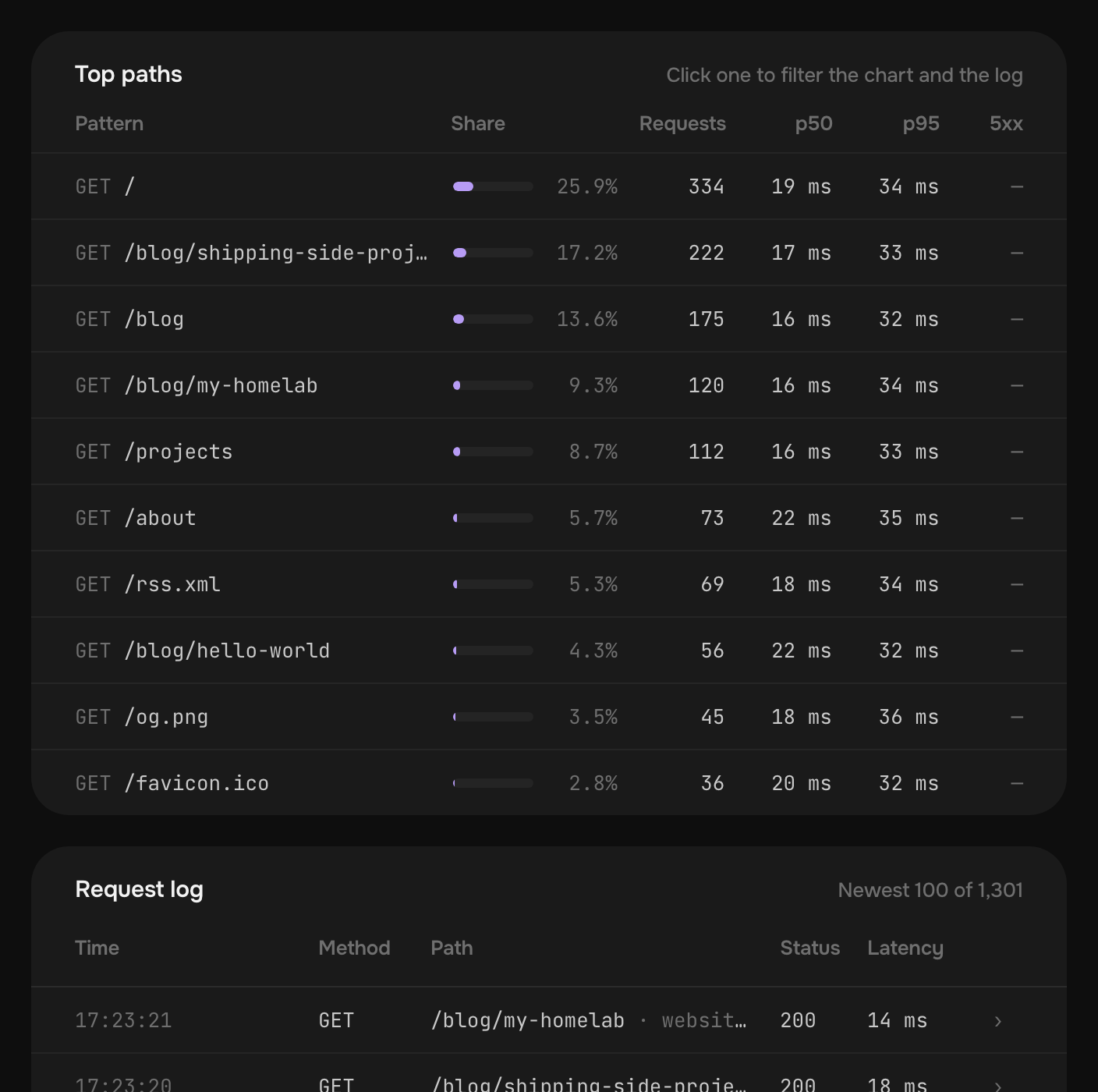
What is already done for you: HTTPS with certificates that renew themselves, deploys from GitHub, nightly backups kept for 14 days, SSH into any container, and every request counted, with no script in your pages. The panel shows the busiest paths of the last 30 days, which for a blog is the list of posts people really read. Nothing sleeps, so a reader never waits for a cold start. The plans are on the pricing part of the first page.
Pethost is the best pick for
- Bloggers who build more than a blog: the Jekyll site, an app and its database on one plan, on one bill
- Developers with several sites, a docs site and a project page each, at one flat price
- People whose agent deploys for them: Claude Code or Codex deploys the site and reads its logs
- Small teams who keep a site behind a password page until it launches
Look elsewhere if
- Your application needs several regions or autoscaling
Questions
Does a Jekyll site need a Dockerfile to deploy on Pethost?
Yes. A project on Pethost runs from a Dockerfile or a Compose file, and pethost deploy does not write one for Jekyll. The 38 lines on this page are the whole file: Ruby builds the site, and Caddy serves _site.
Which Ruby version does the Jekyll Dockerfile use?
The one its first line names: ruby:4.0, which was Ruby 4.0.9 when we built it. Jekyll asks for Ruby 2.7.0 or higher, and a site that pins a version in .ruby-version should name the same one there.
Why are the links in my Jekyll feed relative?
Because url is empty in _config.yml, as jekyll new leaves it. Set it to the site's address, such as url: "https://my-site.sam.pethost.app", and deploy again: the feed's links then carry the whole address.
Can I deploy a Jekyll site from GitHub on every push?
Yes. Deploy the folder once with pethost deploy, then run pethost github owner/repository. From then on every push builds the site with the same Dockerfile and deploys it, and pethost rollback goes back to an earlier commit.
How do I use a custom domain with HTTPS for a Jekyll site?
Run pethost domain add www.example.com and make the one DNS record it prints, a CNAME to your machine's name. A certificate from Let's Encrypt comes by itself once the name resolves, and renews itself.
What does it cost to host a Jekyll site on Pethost?
€9.99 a month for Starter, with 2 vCPU, 3 GB and 30 GB and no fee per project: your other sites, apps and databases run there too. There is no free tier. Prices are without VAT.
The screens are deploys of the site jekyll new made, with Jekyll 4.4.1 and minima 2.5.2, Ruby 4.0.9 and Bundler 4.0.23, and pethost 0.2.4, on a test machine of ours that had neither Ruby's nor Caddy's image before the first deploy. The account in them is the example one, sam.
- Jekyll: quickstart
- Jekyll: installation and its requirements
- Jekyll: step by step, deployment
- Jekyll: permalinks
- pethost, the command line of Pethost
Put your projects online today
Deploy apps, bots and databases from your agent, GitHub or the browser, as many as fit, at one flat price. Nothing metered, nothing billed on top.