Blog · Deploy guides
How to deploy a Streamlit app in 2026: one command, HTTPS and a Dockerfile you keep
You have a Streamlit app that runs with streamlit run on your laptop, and you want it online at an address with HTTPS, for people who have no Python. On Pethost that is one command, pethost deploy, run in the folder that has requirements.txt. It writes the Dockerfile, builds the app on your Pethost machine and prints its address. The app from Streamlit's own first pages was online in 52 seconds, and a later change to its code in 3.
- One command:
pethost deployin the folder withrequirements.txt. No config file, no port to open, no Docker on your laptop. - What it does: writes a Dockerfile that installs your packages and runs
streamlit run streamlit_app.py, and sends the address to port 8501. - Widgets work: Streamlit's WebSocket goes through Pethost's proxy, with nothing to set.
- API keys go in
.env, which the first deploy takes along;pethost env setchanges a key later. - The price: €9.99 a month for 2 vCPU, 3 GB and 30 GB, for every project you have. There is no free tier.
What you need to deploy a Streamlit app in 2026
Three things: the app, the pethost command and a Pethost account.
The app here is the one Streamlit's docs start you with. Their installation guide makes a virtual environment inside the project's folder and installs Streamlit into it:
$ cd my-app
$ python -m venv .venv
$ source .venv/bin/activate
$ pip install streamlit
Then streamlit_app.py, with the slider of Streamlit's first lesson:
import streamlit as st

st.title("My app")

x = st.slider("x")  # 👈 this is a widget
st.write(x, "squared is", x * x)
And requirements.txt, the list of what the app installs, with one line: streamlit.
The command is one program, installed by one line. Every command it has is in the CLI's reference.
curl -fsSL https://pethost.dev/install.sh | sh      # macOS, Linux
irm https://pethost.dev/install.ps1 | iex           # Windows, in PowerShell
The account needs a plan. If you are not signed in, pethost deploy opens your browser and signs you in. If you have no plan yet, it shows you where to choose one, and waits.
Deploy the Streamlit app with one command
Go to the folder that has requirements.txt and run pethost deploy. This is the whole screen:
$ pethost deploy
Name it [my-app]:                it will live at https://my-app.sam.pethost.app
✓ Packed 2 files, 131 B   (left out .venv)
✓ Uploaded straight to your machine
✗ /compose.yaml: the project directory has no compose.yaml at its root: add one
✓ Streamlit app detected, wrote Dockerfile and .dockerignore.
✓ Packed 4 files, 601 B   (left out .venv)
✓ Uploaded straight to your machine
✓ Built and started in 52 s
  · wrote compose.yaml for the Dockerfile: the service app, reading .env, port 8501
✓ app listens on 8501 → https://my-app.sam.pethost.app
  It answers 200.

https://my-app.sam.pethost.app

Wrote .pethost (commit it). Next: pethost logs -f · pethost open- It asks one thing The project's name, the first word of its address. Enter takes the folder's name.
- It leaves the virtual environment out
.venvheld 450 MB of packages, which the machine installs itself. - The machine finds nothing to run The line with the cross: the folder has no Dockerfile or Compose file yet.
- pethost writes the Dockerfile
requirements.txtnamesstreamlit, so it writes Streamlit's and uploads the folder again. - The machine builds and starts it It sees the app listen on 8501, sends the HTTPS address there, and pethost prints the answer: 200.
The file .pethost says which project this folder is. Commit it with the Dockerfile, and the next deploy asks nothing.
Open the app: widgets and the WebSocket
A Streamlit page reaches the app over a WebSocket, /_stcore/stream: every widget you move goes over it, and the script runs again on the server. When that fails, the page shows its loading skeleton forever; Streamlit's knowledge base blames CORS, or a proxy that strips the WebSocket's headers.
On Pethost nothing was set for it. In a browser the app was drawn in under a second, over wss://my-app.sam.pethost.app/_stcore/stream: “0 squared is 0”, and with the slider moved to 10, “10 squared is 100”. Streamlit's health check answers too:
$ curl https://my-app.sam.pethost.app/_stcore/health
ok
pethost logs -f follows what the app prints. The “External URL” Streamlit prints there is open to no one: the address is the HTTPS one.
The Dockerfile that pethost writes for Streamlit
This is the file as it was written into the folder, whole:
# Written by pethost deploy for this Streamlit app: Python 3.14 (no .python-version
# names another), pip installs it (requirements.txt), streamlit_app.py is what it starts
# with.
# It is yours now: change it as you like. pethost does not write it again.

FROM python:3.14
WORKDIR /app

COPY . .

RUN --mount=type=cache,target=/root/.cache/pip \
    pip install -r requirements.txt

ENV PYTHONUNBUFFERED=1
EXPOSE 8501
CMD ["streamlit", "run", "streamlit_app.py"]
Its first lines say what pethost read in your folder:
- The Python is 3.14 unless
.python-versionnames another. - The packages come from
requirements.txtby pip, whose downloads stay on your machine, or fromuv.lockby uv. - The app's file is
streamlit_app.py,app.pyormain.py, or the one other.pyfile at the root that imports Streamlit.
requirements.txt must name streamlit. An app made for Streamlit Community Cloud may leave it out, as Community Cloud installs Streamlit itself; pethost then writes no Dockerfile. With the line added, that app was online in 30 seconds.
Change the code and deploy again in 3 seconds
Edit the app and run the same command. The first time it took 42 seconds: the file copies the folder before pip install, so one changed line installs the packages again. The Dockerfile is yours, so copy requirements.txt first:
COPY requirements.txt .
RUN --mount=type=cache,target=/root/.cache/pip \
    pip install -r requirements.txt

COPY . .
The deploy that changed the file took 34 seconds. After it, a change to the code skips the install:
$ pethost deploy
my-app (.pethost)
✓ Packed 5 files · uploaded · built and started in 3 s
…
  It answers 200.
https://my-app.sam.pethost.app
To deploy on every push instead, connect the repository once: pethost github sam/my-app. pethost rollback puts the version before back. An AI agent can do all of this through Pethost's MCP server: how an agent deploys and looks after a project.
Deploy a Streamlit app that reads a CSV
Most Streamlit apps show data, often a file beside the code. This one reads the Palmer penguins table once, keeps it with st.cache_data, and charts the island picked in a select box:
@st.cache_data
def load_data():
    return pd.read_csv("data/penguins.csv")
With streamlit and pandas in requirements.txt, the same command packed its 3 files, 15 KB, and the app was online in 27 seconds. The CSV went with the folder, and the path that works on your laptop works on the machine. In the browser, picking Dream redrew the count, the chart and the table.
The machine is always on, so what st.cache_data keeps stays warm for the next visitor, and nobody waits for the app to wake up. A file the app writes as it runs is lost when a deploy makes a new container. Keep what must last in a database: a Postgres is one click, at no extra cost.
Keep the API key in .env, not in the code
An API key belongs neither in the code nor in Git. This app asks NASA's API which asteroids pass Earth on a day picked in a date input. On the laptop, python-dotenv reads the key from .env:
load_dotenv()  # the .env beside this file, when you run it on your laptop
…
answer = requests.get(
    "https://api.nasa.gov/neo/rest/v1/feed",
    params={"start_date": day, "end_date": day, "api_key": os.environ["NASA_API_KEY"]},
)
.env has one line, NASA_API_KEY=DEMO_KEY, NASA's key for trying the API (api.nasa.gov gives your own for a name and an email). The first deploy takes .env along:
$ pethost deploy
Name it [asteroids]:          it will live at https://asteroids.sam.pethost.app
✓ Packed 4 files, 863 B   (took .env from this folder)
…
✓ app listens on 8501 → https://asteroids.sam.pethost.app
  It answers 200.
The page said 8 asteroids pass Earth on 2026-10-20, and 10 on the 21st once the date was changed. From then on the project's .env lives on the machine, and a change to your laptop's file stays on the laptop. The next deploy says so:
$ pethost deploy
asteroids (.pethost)
✓ Packed 6 files · uploaded · built and started in 38 s
  · kept the project's .env in place of the version's own: after the first deploy the project's is kept
…
To send this folder's .env:  pethost env push
pethost env set changes one variable and deploys at once. A bare name, pethost env set NASA_API_KEY, asks for the value without showing it. Streamlit reads its options from variables too:
$ pethost env set STREAMLIT_BROWSER_GATHER_USAGE_STATS=false
asteroids (.pethost)
✓ /.env has STREAMLIT_BROWSER_GATHER_USAGE_STATS now. Deployed in 39 s.
The app started again without its line about usage statistics. pethost env push sends your whole .env instead, and first names each variable the project's file would lose, and asks.
st.secrets reads .streamlit/secrets.toml, not the environment. A folder deployed with pethost deploy takes that file along, and st.secrets worked on the machine. A repository should not hold it, so an app deployed from GitHub keeps its keys in .env.
Deploy the Dockerfile from Streamlit's Docker tutorial
If you followed Streamlit's tutorial “Deploy Streamlit using Docker”, your folder has its Dockerfile already. Keep it: pethost deploys a folder's own Dockerfile as it is. Here is the tutorial's, with COPY . . in place of its git clone, as the tutorial says for code beside the Dockerfile:
FROM python:3.12-slim

WORKDIR /app

RUN apt-get update && apt-get install -y …

COPY . .

RUN pip3 install -r requirements.txt

EXPOSE 8501

HEALTHCHECK CMD curl --fail http://localhost:8501/_stcore/health

ENTRYPOINT ["streamlit", "run", "streamlit_app.py", "--server.port=8501", "--server.address=0.0.0.0"]
$ pethost deploy
Name it [spiral]: it will live at https://spiral.sam.pethost.app
✓ Packed 3 files, 2 KB
✓ Uploaded straight to your machine
✓ Built and started in 1 min 25 s
· wrote compose.yaml for the Dockerfile: the service app, reading .env, port 8501
✓ app listens on 8501 → https://spiral.sam.pethost.app
It answers 200.The tutorial's spiral redrew its chart as the sliders moved. Its docker run -p 8501:8501 has no part here: the machine finds the port and opens nothing but HTTPS. The HEALTHCHECK runs, and Docker called the container healthy.
Use your own domain for the Streamlit app
Every name under your account's domain works at once, with HTTPS. A domain you own is one command, pethost domain add dashboard.example.com, which prints the CNAME record to make; the certificate comes once the name resolves.
What you get for the price
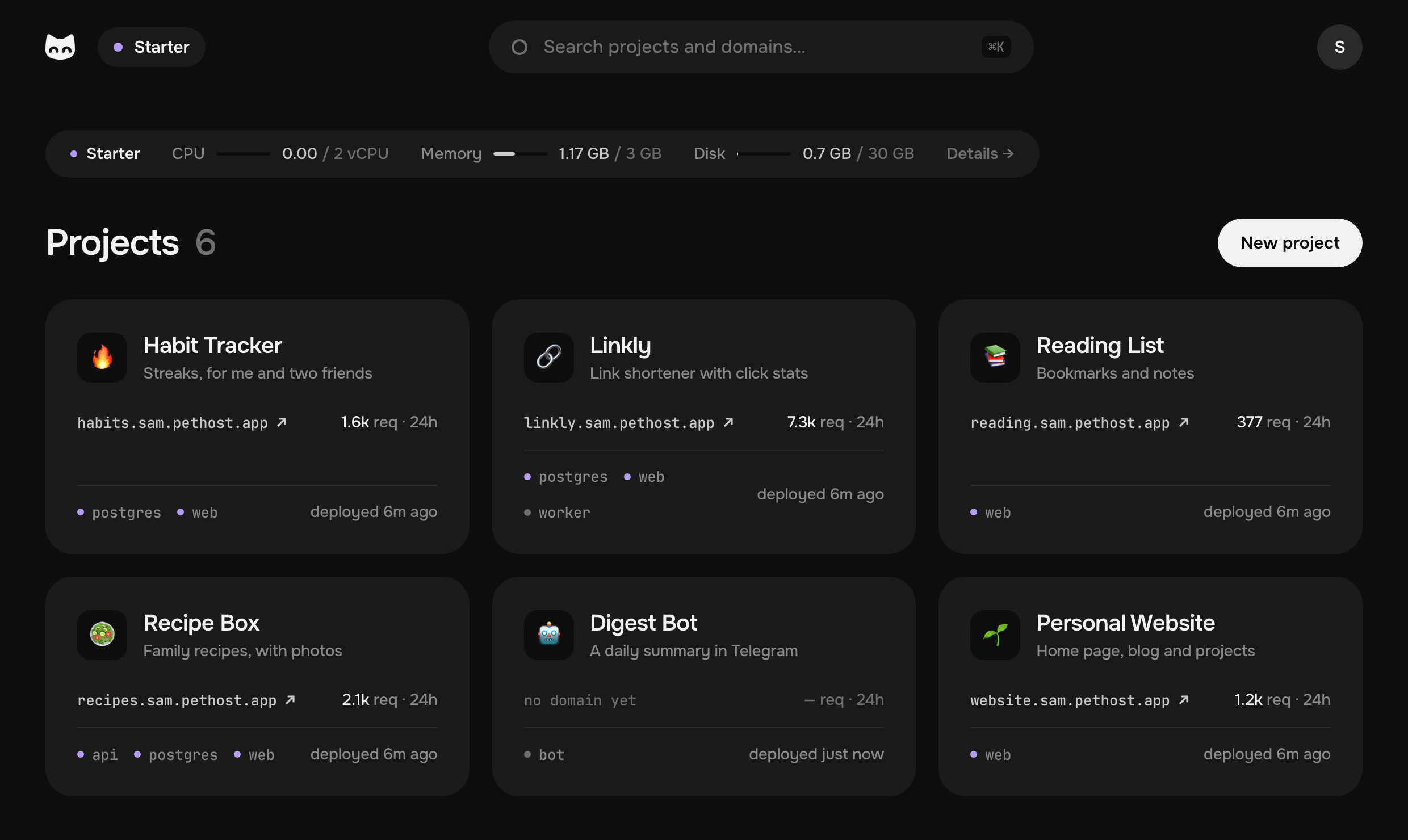
Pethost is €9.99 a month for everything you host, on 2 vCPU, 3 GB of memory and 30 GB of disk. A dashboard is rarely alone: the job that fills its data, its database and your next app run beside it, with no fee per project.
- €9.99 a month for all your projects, nothing metered
- 52 s to build and start the first app
- 3 s to deploy a change to its code
What is already done for you: HTTPS with certificates that renew themselves, deploys from GitHub, nightly backups kept for 14 days, SSH into any container, and every request counted, with no script in your pages. The plans are on the pricing part of the first page.
Pethost is the best pick for
- Data people with a Streamlit app to share with colleagues or clients at an address of their own
- Solo developers with several dashboards, bots and side projects, and one bill to pay
- People whose agent deploys for them: Claude Code or Codex puts the app online and reads its logs
- Early startups who want a fixed monthly cost while the product is small
Look elsewhere if
- Your application needs several regions or autoscaling
Questions
How do I deploy a Streamlit app without writing a Dockerfile?
Run pethost deploy in the folder with requirements.txt. It writes the Dockerfile that runs streamlit run and deploys it; the file stays in your folder, yours to change.
Why does my deployed Streamlit app never finish loading?
The page reaches the app over a WebSocket at /_stcore/stream, and when that fails it shows its loading skeleton forever. On Pethost the WebSocket goes through the proxy with nothing to set.
Which port does a Streamlit app use on Pethost?
Streamlit's own, 8501. The machine finds the port the app listens on and sends the HTTPS address there: you open nothing.
Where do I put API keys for a deployed Streamlit app?
In the project's .env, which the first deploy takes from your folder; pethost env set NAME changes a key without showing it, and the app reads os.environ. st.secrets works for a folder deployed with its secrets.toml.
What does it cost to host a Streamlit app on Pethost?
€9.99 a month for Starter, with 2 vCPU, 3 GB and 30 GB, and no fee per project: your other apps and databases run there too. There is no free tier. Prices are without VAT.
The screens are deploys on a test machine of ours, with pethost 0.2.4, Streamlit 1.66.1 and Python 3.14.9 (3.12.15 in the tutorial's Dockerfile). my-app was deployed first; the CSV and API-key apps found Python 3.14's image already on the machine. The account in them is the example one, sam.
- Streamlit: install Streamlit using command line
- Streamlit: basic concepts
- Streamlit: deploy Streamlit using Docker
- Streamlit: app is not loading when running remotely
- Streamlit: secrets management
- Streamlit: app dependencies for Community Cloud
- NASA: open APIs
- Palmer penguins: the data
- pethost, the command line of Pethost
Put your projects online today
Deploy apps, bots and databases from your agent, GitHub or the browser, as many as fit, at one flat price. Nothing metered, nothing billed on top.