Blog · Hosting comparisons
Coolify vs Dokploy vs CapRover vs Dokku vs Kamal in 2026: self-hosted PaaS compared, with the real costs
Coolify vs Dokploy, or CapRover, Dokku or Kamal: which self-hosted PaaS should run your apps on a VPS in 2026, and do you need to run one at all? Coolify and Dokploy are the full panels: each runs a Docker Compose file, takes several servers and backs up to a bucket you bring, and each asks for 2 GB of memory for itself. With all five the server stays yours to rent, update and secure. On Pethost the server comes with the panel, the backups and the updates done: €9.99 a month for 2 vCPU, 3 GB and 30 GB.
- Coolify vs Dokploy: both run Compose, back up to an S3 bucket you bring and have an official MCP server, and each asks for 2 GB of RAM. Coolify (v4.4) is built for many servers; Dokploy (0.30, open core) has Swarm and a Requests screen.
- The lighter ones: CapRover and Dokku run in 1 GB; CapRover reads a subset of Compose, Dokku none. Kamal is a deploy command with no panel and no backups.
- Left to you: the server (Hetzner's 2 vCPU, 4 GB CPX22 is €19.49 a month), its updates, the backups' storage, outside checks of your sites, and the advisories: 61 for Coolify in 2026, 56 for Dokploy.
- Pethost is the best value where the projects are the point: €9.99 a month for 2 vCPU, 3 GB and 30 GB, with one-click databases, nightly off-machine backups, every request for 30 days, a check of each site every minute and an MCP server made for agents.
Coolify vs Dokploy vs CapRover vs Dokku vs Kamal: the comparison table
The five, from their own documentation; the last row is managed hosting. Easypanel alternatives has the closed-source panel the same searches name.
| Tool | Licence, price | Panel or command line | Docker Compose | Several servers | Backups | Memory it asks for | Latest release, 2026 |
|---|---|---|---|---|---|---|---|
| Coolify | Apache-2.0, free | Web panel, MCP server | Yes: parsed and extended, or run raw | Yes, over SSH | Databases and volumes, to a bucket you bring | 2 cores, 2 GB, 10 GB of disk | v4.4.7, 21 October |
| Dokploy | Apache-2.0, paid part source-available, free | Web panel, MCP server | Yes, with Traefik labels added | Yes, also as a Swarm | Databases and named volumes, to a bucket you bring | 2 GB, 30 GB of disk | v0.30.10, 22 October |
| CapRover | Apache-2.0 with an appendix, free | Web panel, CLI | Partly: an “experimental” subset, no build | Partly: a Swarm; apps with data stay on one node | No: “everything except images and volumes” | About 1 GB | v1.15.4, 30 August |
| Dokku | MIT, free; a web UI is Dokku Pro, $849 once | Command line | No | No: one server, or a K3s cluster | Databases by plugin; volumes by hand | 1 GB | v0.38.31, 27 September |
| Kamal | MIT, free | Command line, no panel | No: a deploy.yml | Yes; the load balancer is yours | None | Not stated | v2.12.0, 18 June |
| Pethost, managed | €9.99 a month, the server included | Web panel, MCP server | Yes, as written | No: one machine | Nightly, off the machine, 14 days, included | None: the system's share is not counted in the 3 GB | Nothing for you to update |
Each self-hosted PaaS in 2026, one by one
Coolify: many servers, out of beta since April
Coolify deploys apps, databases and 300+ one-click services to servers it reaches over SSH, of any provider or your own hardware. v4.0.0 ended a long beta on 27 April 2026; v4.4, on 6 October, brought an audit log and traffic analytics.
Dokploy: still 0.x, open core since January
Dokploy is built on Docker, Swarm and Traefik, with remote servers, build servers and a Requests screen in its free edition. Since 21 January 2026 its licence adds a source-available part “for future paid functionality”. Updates are by hand: “you update Dokploy manually when new versions are released.”
CapRover: a light panel on Docker Swarm
CapRover is a panel on Docker Swarm, in about 1 GB, built for scaling a stateless app over several nodes. Its Compose support “is still experimental and does not implement the complete Compose specification”.
Dokku: git push on one server
Dokku calls itself “An open source PAAS alternative to Heroku”: git push, buildpacks, one server, no panel. The request “Docker Compose Support” has been open since 9 April 2022, and backups are by hand: “The backup plugin was deprecated in 0.4.x”.
Kamal: a deploy command, not a panel
Kamal, from 37signals, runs on your laptop or in CI and drives servers over SSH, as root by default. Its own page says: “You're probably still better off with a fully managed service if basic Linux or Docker is still difficult”.
Coolify vs Dokploy vs Pethost: Docker Compose, backups and request logs
Docker Compose on each
Coolify “parses the definition and adds the configuration required to manage the resource”; its Raw Compose mode runs the file untouched. Dokploy “automatically adds Traefik labels internally to your Docker Compose file”, and the variables set in its panel go to .env “but are not automatically injected into containers”. Pethost runs the compose.yaml as written, or refuses it with what to write instead: more in managed Docker Compose hosting.
Databases and backups: who keeps the bucket?
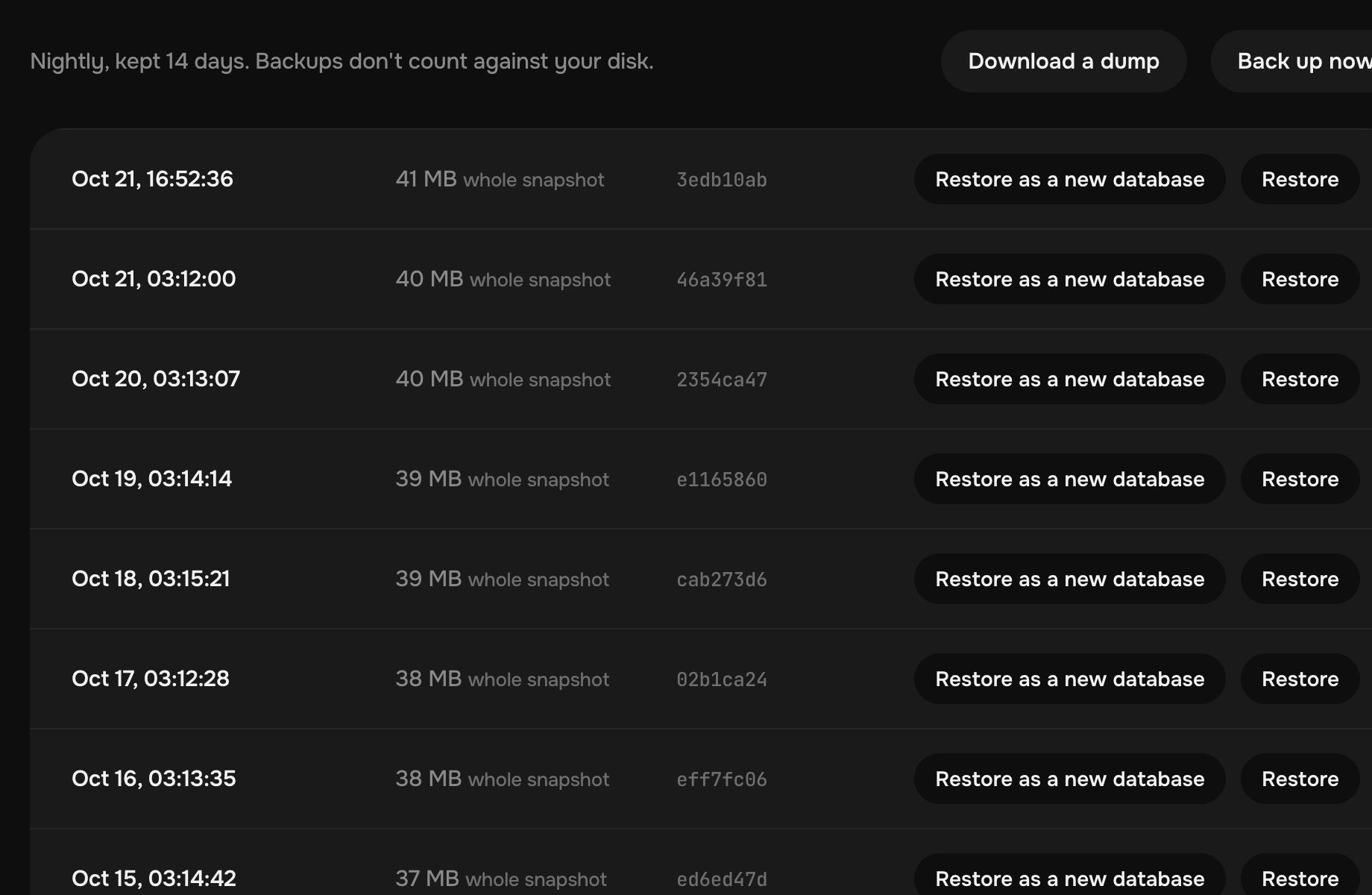
Coolify backs up databases and volumes to a local archive on the same server by default, and “Local storage alone does not protect against losing that server”: the S3 bucket is yours to bring. Dokploy needs one too, and its volume backups “only work with Docker named volumes, not with bind mounts”. On Pethost a database is one click, Postgres, MariaDB or Valkey, at no extra cost, and every project is backed up each night, encrypted, off the machine, for 14 days.
Request logs, monitoring and alerts
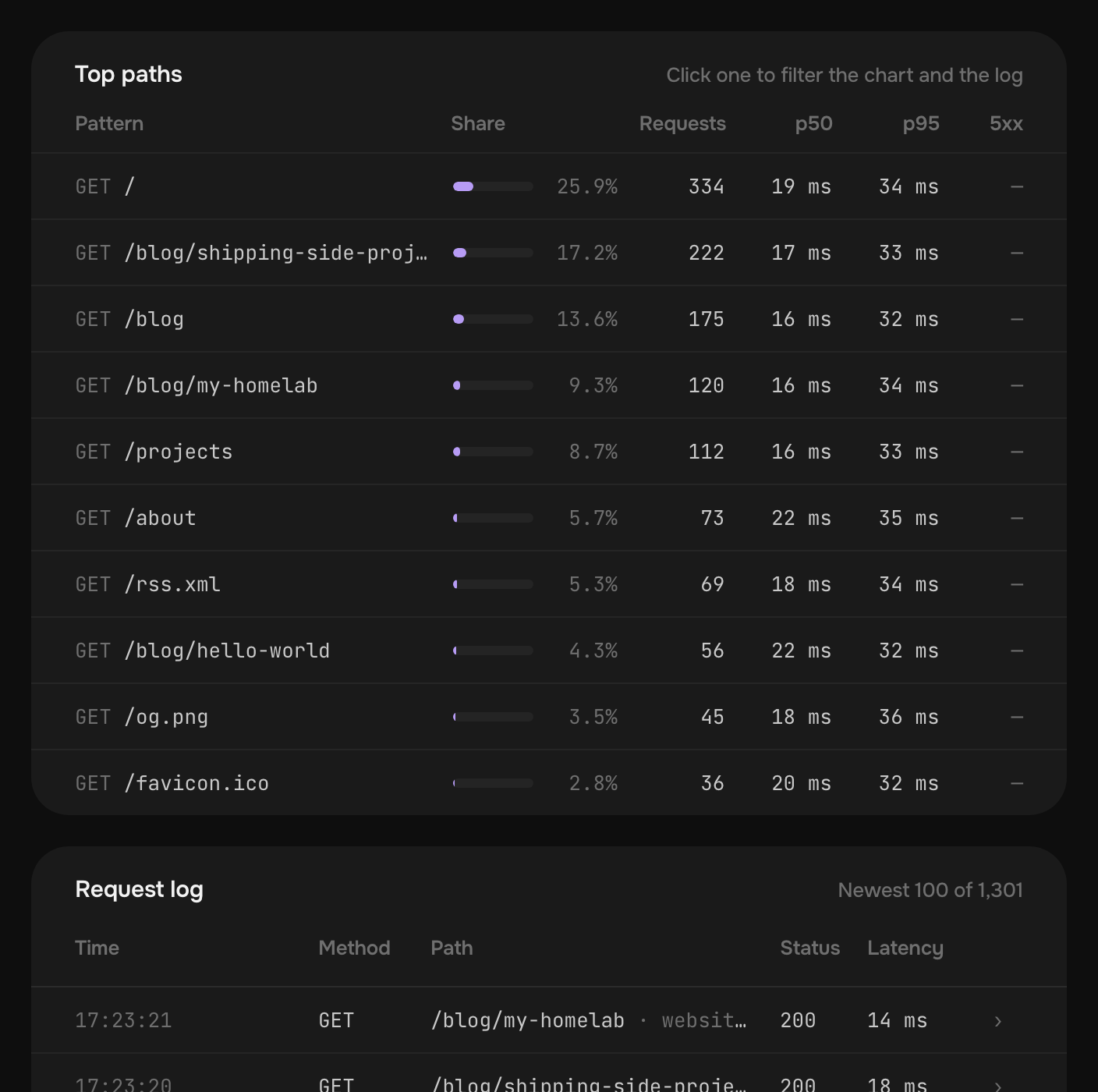
Coolify's traffic analytics, new in v4.4, are off by default and store “aggregates rather than raw request logs”. Its monitoring page lists what “requires an external system”: threshold alerts, “Public endpoint checks from outside your infrastructure”, and log retention. Dokploy's Requests screen keeps what Traefik handled for a time it does not state, and its CPU and memory alerts are “only available on Cloud Version of Dokploy.” On Pethost every request is kept for 30 days, each site is checked every minute, and a message goes by email, Telegram or Slack when one is down, slow or failing.
What a self-hosted PaaS really costs: the work the software leaves
The software costs nothing and leaves the jobs below. A hosted panel takes one of them: see Coolify Cloud vs Dokploy Cloud.
| The job | The panel on your server | Coolify Cloud, Dokploy Cloud | Pethost |
|---|---|---|---|
| The server | You rent it | You rent it | In the price: 2 vCPU, 3 GB, 30 GB |
| System updates, firewall | You | You | Done for you |
| The panel's updates | You; Coolify can update itself | The vendor | Done for you |
| Storage for backups | A bucket you bring | A bucket you bring | In the price: 14 nights, off the machine |
| Checks of your sites | An external system | An external system | Every minute, included |
| The software's price | Free | $5 a month for two servers; $4.50 a server | In the €9.99 |
And the advisories: GitHub lists 61 published for Coolify in 2026, 16 of them critical, and 56 for Dokploy, 33 critical; Dokku has 6, CapRover and Kamal none. Each is closed by an update that is yours to install, and on a hosted panel the server's are still yours. On Pethost there is nothing to update.
Coolify MCP vs Dokploy MCP: what an AI agent can do on each
Both have official MCP servers, built in opposite ways. Coolify's mostly reads: 45 tools by our count, three of which change anything (deploy, cancel_deployment, control), and none creates an app or rolls back. Dokploy's mirrors its whole API in “508 tools across 49 categories”: too many for an agent, which fills its context with them or guesses between look-alikes. For CapRover, Dokku and Kamal we found none. Pethost's tools were made for an agent, each doing one clear thing: deploy, read logs and requests, roll back, restore. Hosting with an MCP server compares them all.
You say: The shop got slow this morning. Find out why.
- QueryHttpTraffic /search: p95 2.4 s since 09:12, was 90 ms
- ListCommits 7be02d4 search by name · last deploy 09:11
- QueryContainerLogs db: duration 2301 ms, SELECT … WHERE name ILIKE
- ReadPath api/search.ts
The agent answers: /search got slow with the 09:11 deploy: it filters products by name, which has no index. I can add one in a migration and deploy it, or roll back to a3f9c1e first.
What if I just rent a VPS and install Coolify or Dokploy?
You can: these tools are made for it. But an agent on a bare server works as root over SSH, where one wrong command takes down the proxy or a database.
And a server is not sure to cost less. Hetzner, the one AI assistants name first, raised its prices on 1 April and again on 15 June 2026, and its cheap Cost-Optimized range has long been out of stock. Its 2 vCPU, 4 GB CPX22 is €19.49 a month, up from €7.99, and the panel takes 2 GB of it.
Self-hosted PaaS vs managed PaaS: what 3 GB of memory costs
A managed PaaS charges by the service, which is why people install a panel. Starter's 3 GB of always-on memory, at each one's plan prices:
| Host, and what the sum is | Price a month |
|---|---|
| Pethost Starter, everything you run | €9.99 |
| Elestio, a 2 vCPU, 4 GB VM at Netcup | $16.06 |
| Fly.io, three 1 GB Machines | $20.10 |
| Railway, the memory alone | $30.00 |
| Sliplane, its 3 vCPU, 4 GB server | €28.80 |
| Render, three instances | $39.00 |
| Heroku, six Basic dynos | $42.00 |
Fly.io's is Ashburn's price, before volumes and a database; Railway adds CPU, disk and traffic. Railway vs Render vs Fly.io pricing has the plans.
What €9.99 a month buys on Pethost, already done
- 3 GB of memory, none of it for the panel
- 14 nights of encrypted backups, off the machine
- 30 days of every request
Starter is 2 vCPU, 3 GB and 30 GB in the EU, for €9.99 a month without VAT. Already working on it: HTTPS on your own domain, a deploy on every GitHub push and back to an earlier commit in one step, databases with their editor, alerts, SSH and SFTP into any container, more than 80 apps in one click, and the MCP server. That is the list a Coolify or Dokploy admin builds and keeps, done, for less than the server alone: the best value we found for side projects. There is no free tier. Grow, twice the size, is €17.99.
When to self-host, and when to take managed hosting
Self-hosting is right when the server is the point: root on it, many servers or your own hardware under one panel. Managed hosting is right when the projects are the point: best hosting for side projects has more, and Coolify alternatives and Dokploy alternatives the rest of the field.
Pethost is the best pick for
- Solo developers and indie hackers with several apps, bots and databases, who want them online, not a server to keep
- People who build with Claude Code, Codex or Cursor: tools made for the agent, no root shell to hand it
- Anyone who has run Coolify or Dokploy and would rather not keep the server, the bucket and the updates
Look elsewhere if
- You want many servers or your own hardware under one panel, with root on each: here it is one machine, and SSH reaches your containers, not the machine
Questions
Coolify vs Dokploy: which is better in 2026?
They differ less than people expect: both are free panels that run a Docker Compose file and ask for 2 GB of RAM, on a server that stays yours. Coolify is built for many servers; Dokploy has Swarm, a Requests screen and a source-available paid part.
Is a self-hosted PaaS like Coolify or Dokploy really free?
The software is. The server is not: Hetzner's 2 vCPU, 4 GB CPX22 is €19.49 a month, and the updates and the backups' storage are yours. Pethost Starter is €9.99 a month with all of it included.
Is there a managed Coolify or Dokploy?
Coolify Cloud ($5 a month for two servers) and Dokploy Cloud ($4.50 a server) host the panel only: your apps run on servers you still rent and update. Pethost is managed down to the machine.
How much RAM do Coolify, Dokploy, CapRover and Dokku need?
Coolify “needs 2 CPU cores, 2 GB RAM, and 10 GB disk space to run”, Dokploy “at least 2GB of RAM”, and CapRover and Dokku about 1 GB, before your apps. On Pethost the 3 GB are all yours.
Kamal vs Coolify vs Dokploy vs Dokku: which is a panel?
Coolify and Dokploy are web panels with databases, domains and backups. Dokku is a command-line PaaS on one server. Kamal is a deploy command that leaves no panel: no backups, no Compose, no push-to-deploy.
Coolify vs Dokploy vs Komodo vs Dockge: are they the same kind of tool?
No. Coolify and Dokploy are a self-hosted PaaS: domains, certificates, deploys from Git and backups. Dockge is a “docker compose.yaml stack-oriented manager”, and Komodo “a web application for managing servers, builds, deployments, and automated procedures”: they run the stacks you write.
Read from each project's own pages and GitHub repository; advisories counted through GitHub's API. Prices are in each vendor's currency; ours and Hetzner's are without VAT.
- Coolify: pricing
- Coolify: installation
- Coolify: Docker Compose
- Coolify: backups
- Coolify: monitoring
- Coolify: traffic analytics
- Coolify: MCP
- Coolify: changelog
- Coolify: advisories
- Dokploy: pricing
- Dokploy: installation
- Dokploy: editions
- Dokploy: Docker Compose
- Dokploy: volume backups
- Dokploy: monitoring
- Dokploy: licence
- Dokploy: MCP
- Dokploy: advisories
- CapRover: Compose
- CapRover: backups
- Dokku: backups
- Dokku: issue 5102
- Dokku Pro
- Kamal
- Komodo: introduction
- Dockge: README
- Hetzner: Cost-Optimized
- Hetzner: price adjustment
- Railway: pricing
- Render: pricing
- Fly.io: pricing
- Heroku: pricing
- Sliplane: pricing
- Elestio: pricing
Put your projects online today
Deploy apps, bots and databases from your agent, GitHub or the browser, as many as fit, at one flat price. Nothing metered, nothing billed on top.