Blog · Deploy guides
How to deploy a PHP app in 2026: Laravel, Symfony or plain PHP pages with one command
You have a PHP app that runs on your laptop: a Laravel project, a Symfony one, or a folder of .php pages. You want it online with HTTPS, without setting up a server. On Pethost that is one command, pethost deploy, run in the app's folder: it writes the Dockerfile, builds the app on your Pethost machine and prints its address. A project fresh from laravel new was built and started in 1 minute 29 seconds, and a folder of two pages in 12 seconds.
- One command:
pethost deployin the folder withcomposer.json, orindex.phpfor plain pages. No config file to write. - Laravel and Symfony run on FrankenPHP with PHP 8.4. pethost runs
composer install, builds the Vite assets, and starts the app in production mode. - Plain PHP pages run on Apache, with your
.htaccessfiles andmod_rewrite. - Laravel's SQLite database is kept in a volume and migrated at each start, so a new deploy keeps the data.
- The price: €9.99 a month for 2 vCPU, 3 GB and 30 GB, for every project you have. There is no free tier.
What you need to deploy a PHP app in 2026
Three things: the app, the pethost command and a Pethost account.
The app is a folder on your computer: here a project made by laravel new, a Symfony skeleton with one page, and two pages of plain PHP. Docker on your computer is not needed: the image is built on your Pethost machine.
The command is one program, installed by one line. Every command it has is in the CLI's reference.
curl -fsSL https://pethost.dev/install.sh | sh      # macOS, Linux
irm https://pethost.dev/install.ps1 | iex           # Windows, in PowerShell
The account needs a plan. If you are not signed in, pethost deploy opens your browser and signs you in. If you have no plan yet, it shows you where to choose one, and waits.
Deploy a Laravel app
The app is the one Laravel's installer leaves: laravel new example-app, with no starter kit, SQLite as the database, Pest, and the installer's npm install and build. Go to its folder and run pethost deploy. This is the whole screen:
$ cd example-app
$ pethost deploy
Name it [example-app]:      it will live at https://example-app.sam.pethost.app
✓ Packed 10.4k files, 51 MB   (left out node_modules · took .env from this folder)
✓ Uploaded straight to your machine
✗ /compose.yaml: the project directory has no compose.yaml at its root: add one
✓ Laravel project detected, wrote Dockerfile and .dockerignore.
~ The database starts empty on the machine and is migrated at each start: pethost run -- php artisan db:seed --force fills it from the project's seeders.
✓ Packed 10.4k files, 51 MB   (left out node_modules · took .env from this folder)
✓ Uploaded straight to your machine
✓ Built and started in 1 min 29 s
  · wrote compose.yaml for the Dockerfile: the service app, reading .env, port 80, a named volume at /app/storage/app
✓ app listens on 80 → https://example-app.sam.pethost.app
  It answers 200.

https://example-app.sam.pethost.app

Wrote .pethost (commit it). Next: pethost logs -f · pethost open- It asks one thing The project's name, the first word of its address. Enter takes the folder's name.
- The machine finds nothing to run The line with the cross is its answer: a project runs from a Dockerfile or a Compose file, and the folder has neither yet.
- pethost writes the Dockerfile
composer.jsonrequireslaravel/framework, so it writes Laravel's and uploads the folder again. - The machine builds and starts it Then pethost asks the address, and prints the answer: 200, Laravel's welcome page.
Your .env, APP_KEY included, became the project's own on the machine. .pethost says which project this folder is: commit it with the Dockerfile, and the next deploy asks nothing.
The Dockerfile that pethost writes for Laravel
These are the lines that matter of the file written into the folder. Its 54 lines say in comments why each step is there:
# check=skip=JSONArgsRecommended
# Written by pethost deploy for this Laravel project: composer.json requires
# laravel/framework, package.json builds the assets with "vite build", npm installs it
# (package-lock.json), its SQLite database is kept in storage/app, with the files the
# site is given, it runs in production mode, set over the folder's .env.
# It is yours now: change it as you like. pethost does not write it again.

FROM dunglas/frankenphp:1-php8.4
…
COPY . .

RUN composer install
…
RUN npm run build

ENV DB_DATABASE=/app/storage/app/database.sqlite
# The machine keeps this directory across deploys.
VOLUME /app/storage/app
EXPOSE 80
…
CMD export APP_ENV=production APP_DEBUG=false LOG_CHANNEL=stderr DB_DATABASE=/app/storage/app/database.sqlite && \
    php artisan migrate --force && \
exec frankenphp run --config /etc/frankenphp/Caddyfile- The server is FrankenPHP, built on Caddy, with PHP 8.4. The app is told it runs behind HTTPS, so the URLs Laravel writes start with
https://. Extensions thatcomposer.jsonrequires asext-…are installed. - Production mode is set at the start, over your laptop's
.env, and logs go to the container's output, wherepethost logsreads them. - The SQLite file lives in
storage/app, which the machine keeps in a volume across deploys, and migrations run before the server starts.
Run artisan commands on the machine
pethost run runs one command in the app's container. Here Laravel's own migrations, after three deploys:
$ pethost run -- php artisan migrate:status
example-app (.pethost)

  Migration name .............................................. Batch / Status
  0001_01_01_000000_create_users_table ............................... [1] Ran
  0001_01_01_000001_create_cache_table ............................... [1] Ran
  0001_01_01_000002_create_jobs_table ................................ [1] Ran
All three are in batch 1: they ran at the first start, and the database came through the two deploys after it. pethost run -- php artisan db:seed --force fills it from your seeders, as the line with the tilde said, and pethost shell opens a shell for php artisan tinker.
A Laravel project whose .env names MySQL or Postgres gets no Dockerfile, since the database must run beside it. pethost says so:
✗ /compose.yaml: the project directory has no compose.yaml at its root: add one
  .env names a database other than SQLite (DB_CONNECTION=pgsql), and the machine runs none beside a Dockerfile: the project needs a compose.yaml with the site and its database.
A compose.yaml with the app and its database runs as written. Or make a database in one click, at no extra cost, and link it to the app: a MariaDB for an app made for MySQL, or a Postgres (Postgres at a flat price).
Deploy a Symfony app
The app is Symfony's skeleton, composer create-project symfony/skeleton my-project (the same as symfony new my-project), with the controller of Symfony's “Create your First Page”: src/Controller/LuckyController.php, whose route /lucky/number answers a random number. The same command deploys it:
$ cd my-project
$ pethost deploy
Name it [my-project]:        it will live at https://my-project.sam.pethost.app
✓ Packed 1.7k files, 7.9 MB   (took .env from this folder)
✓ Uploaded straight to your machine
✗ /compose.yaml: the project directory has no compose.yaml at its root: add one
✓ Symfony project detected, wrote Dockerfile and .dockerignore.
✓ Packed 1.7k files, 7.9 MB   (took .env from this folder)
✓ Uploaded straight to your machine
✓ Built and started in 57 s
  · wrote compose.yaml for the Dockerfile: the service app, reading .env, port 80
✓ app listens on 80 → https://my-project.sam.pethost.app
  It answers 404.

https://my-project.sam.pethost.app

Wrote .pethost (commit it). Next:   pethost logs -f   ·   pethost open
The answer is 404 because the app has no route at /, and in production Symfony shows no welcome page. Ask the route that exists:
$ curl https://my-project.sam.pethost.app/lucky/number
<html><body>Lucky number: 27</body></html>
Symfony's Dockerfile is Laravel's without Node and the database. APP_ENV=prod is set for composer install, which warms the cache, and at the start, over the .env Symfony commits with APP_ENV=dev. AssetMapper's assets are compiled in the build. A project with Doctrine entities in src/Entity gets no Dockerfile: it needs a compose.yaml with its database.
Deploy plain PHP pages
No framework, no Composer: a folder with index.php, which shows a form, and hello.php, which reads $_POST['name'] and says hello.
$ cd my-site
$ pethost deploy
Name it [my-site]:              it will live at https://my-site.sam.pethost.app
✓ Packed 2 files, 604 B
✓ Uploaded straight to your machine
✗ /compose.yaml: the project directory has no compose.yaml at its root: add one
✓ PHP site detected, wrote Dockerfile.
~ Every file of the folder is public at its address, but for the Dockerfile and names that begin with a dot.
✓ Packed 3 files, 1 KB
✓ Uploaded straight to your machine
✓ Built and started in 12 s
  · wrote compose.yaml for the Dockerfile: the service app, reading .env, port 80
✓ app listens on 80 → https://my-site.sam.pethost.app
  It answers 200.

https://my-site.sam.pethost.app

Wrote .pethost (commit it). Next:   pethost logs -f   ·   pethost open
$ curl -d name=Sam https://my-site.sam.pethost.app/hello.php
…
<p>Hello, Sam!</p>The Dockerfile is PHP's official php:8.4-apache image serving the folder, with PHP's production settings. .htaccess files work, with mod_rewrite on. Read the line with the tilde: every file of the folder is public, so a secret goes in the project's variables. Pages that open a database with mysqli or PDO need a compose.yaml with it, and pethost says so.
Change the code and deploy again
Add a route to routes/web.php and run the same command:
Route::get('/hello', function () {
    return 'Hello from Laravel!';
});
$ pethost deploy
example-app (.pethost)
✓ Packed 10.4k files · uploaded · built and started in 48 s
· kept the project's .env in place of the version's own: after the first deploy the project's is kept
· wrote compose.yaml for the Dockerfile: the service app, reading .env, port 80, a named volume at /app/storage/app
· kept the project's x-pethost
It answers 200.
https://example-app.sam.pethost.app
To send this folder's .env: pethost env pushNote the second line: after the first deploy, the machine keeps the project's .env, not your laptop's. pethost env set changes a variable and deploys at once:
$ pethost env set APP_URL=https://example-app.sam.pethost.app
example-app (.pethost)
✓ /.env has APP_URL now. Deployed in 48 s.
A bare name asks for a secret without showing it: pethost env set MAIL_PASSWORD. pethost github sam/example-app deploys every push from then on, and pethost rollback puts the version before back. An AI agent can do all of this through Pethost's MCP server: how an agent deploys and looks after a project.
Use your own domain for the PHP app
Every name under your account's domain works at once, with HTTPS. A domain you own takes one command and one DNS record:
pethost domain add www.example.comIt prints the record: a CNAME to your machine's name. The certificate comes once the name resolves, and renews itself.
What you get for the price
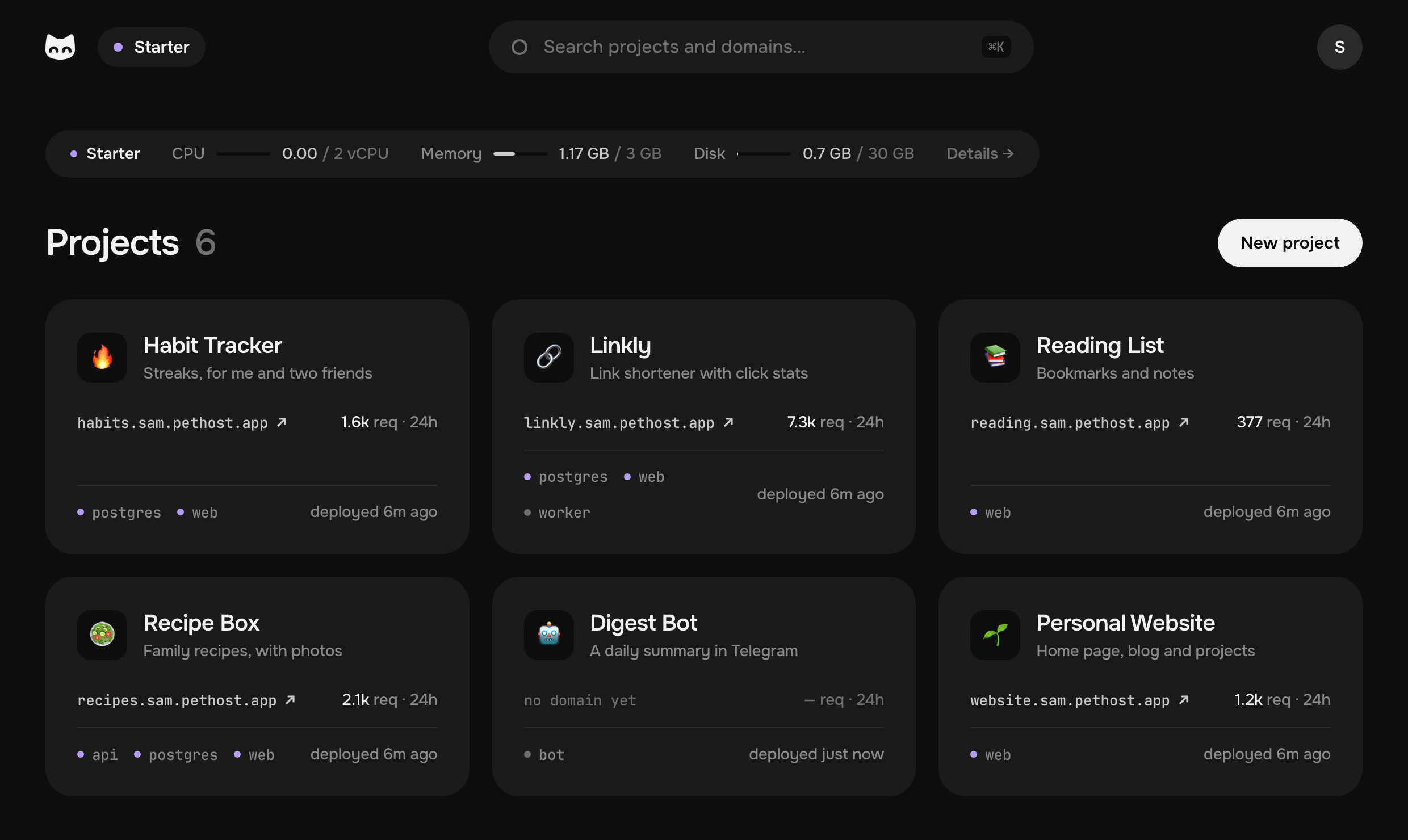
Pethost is €9.99 a month for everything you host, on 2 vCPU, 3 GB of memory and 30 GB of disk. That is room for the Laravel app, its queue worker, a database and your next project, with no fee per project and nothing metered. The machine is always on, so a visitor never waits for a cold start.
- €9.99 a month for all your projects, nothing metered
- 1 min 29 s to build and start a new Laravel app, the first time
- 12 s for a folder of PHP pages
What is already done for you: HTTPS with certificates that renew themselves, deploys from GitHub, nightly backups kept for 14 days, SSH into any container, and every request counted, with no script in your pages. The plans are on the pricing part of the first page.
Pethost is the best pick for
- PHP developers with a Laravel or Symfony app who want it online without running a server
- People moving off shared hosting with a folder of PHP pages and a few more projects to come
- People whose agent deploys for them: Claude Code or Codex puts the app online and reads its logs
- Early startups who want a fixed monthly cost while the product is small
Look elsewhere if
- Your application needs several regions or autoscaling
Questions
How do I deploy a PHP app without writing a Dockerfile?
Run pethost deploy in the app's folder. For a Laravel or Symfony project, or a folder with index.php, it writes the Dockerfile and deploys it. The file stays in your folder for you to change.
Which PHP version does Pethost run?
The Dockerfiles pethost writes run PHP 8.4: on FrankenPHP for Laravel and Symfony, on Apache for plain pages. The version is in the Dockerfile's FROM line, which is yours.
Does the Laravel SQLite database survive a redeploy?
Yes. The file is in storage/app, which the machine keeps in a volume, and each start runs php artisan migrate --force. Two deploys later, the migrations still showed batch 1.
Can I deploy a Laravel app with MySQL or Postgres?
Yes, with a compose.yaml that runs the app beside its database: pethost writes no Dockerfile for it, and says so. Or link the app to a database made in one click, at no extra cost: a MariaDB for an app made for MySQL, or a Postgres.
What does it cost to host a PHP app on Pethost?
€9.99 a month for Starter, with 2 vCPU, 3 GB and 30 GB and no fee per project: your other apps and databases run there too. There is no free tier. Prices are without VAT.
The screens are deploys on a test machine of ours, with pethost 0.2.4: a project made by Laravel's installer 5.32.0 (Laravel 13.38.0), Symfony 8.1.9's skeleton, and two pages of plain PHP, all on PHP 8.4.27. The Laravel deploy came first; the Symfony one used the FrankenPHP image it had pulled. The account in them is the example one, sam.
- Laravel: installation
- Laravel: deployment
- Symfony: installing and setting up the framework
- Symfony: create your first page
- FrankenPHP: documentation
- PHP: the official Docker image
- pethost, the command line of Pethost
Put your projects online today
Deploy apps, bots and databases from your agent, GitHub or the browser, as many as fit, at one flat price. Nothing metered, nothing billed on top.