Docs · Email
Send email from your app with Resend, SendGrid or Amazon SES
Your app needs to send email: sign-in links, password resets, alerts. On Pethost it sends them through an email provider, Resend, SendGrid or Amazon SES, over SMTP on the provider's port 2587 or 2525, or over its HTTPS API, because SMTP's usual ports 25, 465 and 587 are blocked on some of the networks our machines run on. Here is how, for an app from our templates and for a Docker app of your own.
- Ports 25, 465 and 587 can be closed for connections out of a Pethost machine: some of the networks the machines run on close them, and SMTP on a provider's usual port then times out.
- Use the other port, with STARTTLS: Resend
smtp.resend.com:2587, SendGridsmtp.sendgrid.net:2525, Amazon SESemail-smtp.<region>.amazonaws.com:2587. Our templates send this way. Or use the provider's HTTPS API, on port 443. - Send from a domain you own and verified at the provider, never from an address under
pethost.app. - A template: pick the provider under Sending email in New project, and the SMTP settings go into the app's .env.
- Your own app:
pethost env set RESEND_API_KEY, then call Resend's API.
Send email from a template
These one-click apps send email through a provider you pick when you create them:
 FusionAuth
 Healthchecks
 Kener
 Odoo
 Paperless-ngx
 Vikunja
 Weblate
Here it is Healthchecks, a cron-job monitor that can email its sign-in links and alerts, with Resend.
Step 1: Verify your domain at Resend
On Resend's Domains page, add the domain you will send from, then add the SPF and DKIM records it shows at your DNS host. Resend sends only from a verified domain, and recommends a subdomain, such as mail.example.com: add and verify a domain.
Step 2: Create an API key
On Resend's API keys page, Create API Key with Sending access. Resend shows the key once, so copy it now.
Step 3: Open New project and pick the app
In the panel, click + New, choose From a template, and pick Healthchecks. Fill in Email and Admin password: they are your sign-in.
Step 4: Choose Resend under Sending email
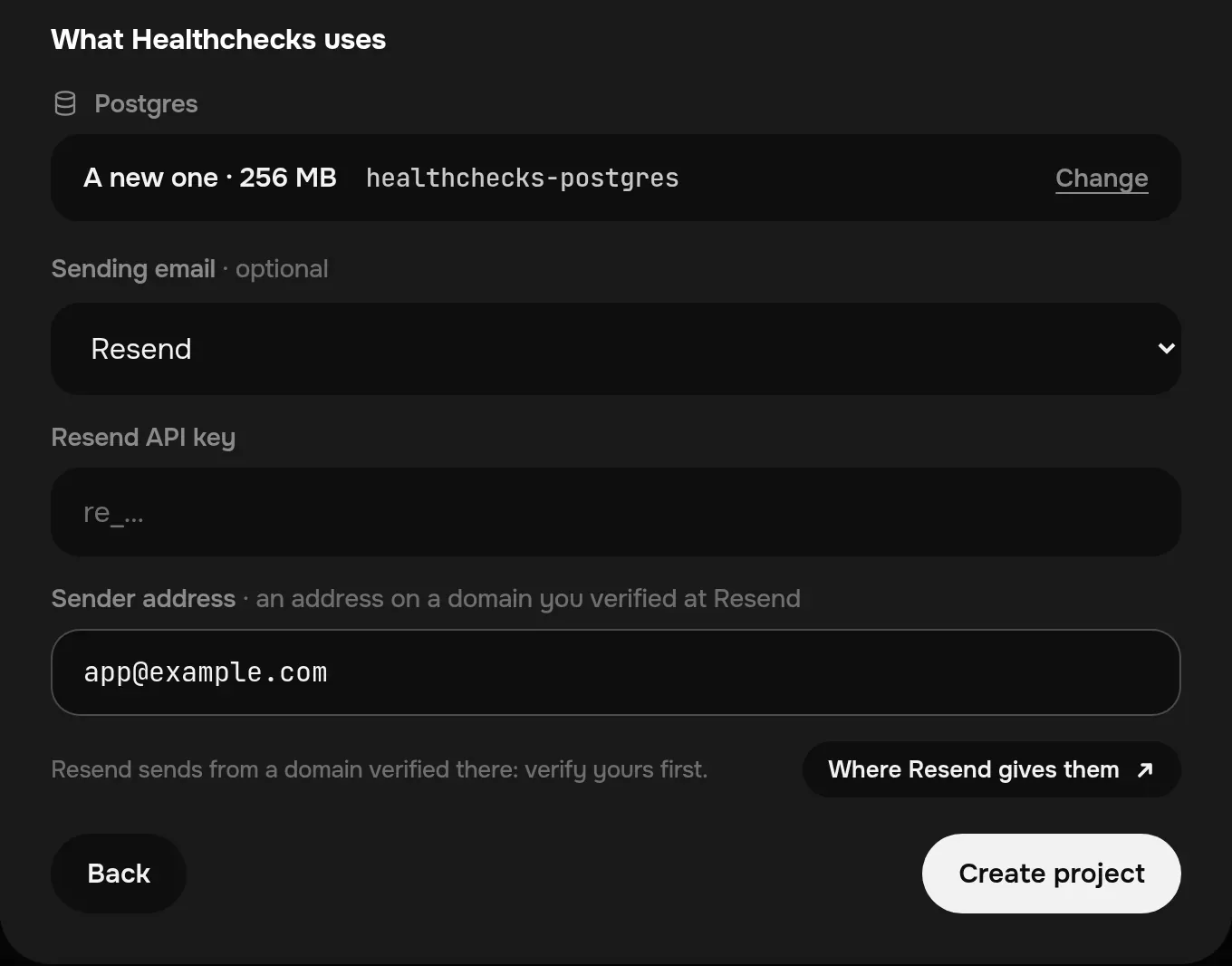
Under What Healthchecks uses, beside its new Postgres, the Sending email · optional list starts at Don't send email. Choose Resend, paste the key into Resend API key, and type the Sender address: an address on the domain you verified, such as [email protected].
Step 5: Create the project
Click Create project. Healthchecks starts with its mail on: on its sign-in page, Email Me a Link sends you a link through Resend. On our test machine that link was in the inbox, not in spam, 3 seconds after the click.
New project writes the provider's settings into the project's .env, and the template's compose.yaml hands them to the app's own mail settings, with STARTTLS:
SMTP_HOST='smtp.resend.com'
SMTP_PORT='2587'
SMTP_USER='resend'
SMTP_PASSWORD='re_…'
SMTP_FROM='Healthchecks <[email protected]>'
To change the provider or the key later, edit those lines: in the panel, the project's Settings, Environment variables, Edit, then Edit .env and Save & deploy. Or from a terminal: pethost env set SMTP_PASSWORD -p healthchecks.
Send email with Resend from your app
An app you deploy yourself, from a folder, a GitHub repository or a compose.yaml, sends through Resend in one of two ways: Resend's HTTPS API, which needs only the key, or SMTP, which every mail library speaks, on port 2587.
Step 1: Verify your domain and create a key
As above: the domain on Resend's Domains page, with its SPF and DKIM records at your DNS host, then an API key with Sending access.
Step 2: Give the app the key
In your project's folder, run this and paste the key when it asks. It writes the key into the project's .env without showing it, and deploys the project (pethost env set):
$ pethost env set RESEND_API_KEY
counter (.pethost)
RESEND_API_KEY: ••••••••
✓ /.env has RESEND_API_KEY now. Deployed in 3 s.
A service gets the variable only where compose.yaml passes it: env_file: .env, or - RESEND_API_KEY=${RESEND_API_KEY} under its environment:. pethost env set sends only .env: after changing compose.yaml, run pethost deploy. An app deployed from a Dockerfile alone gets the whole .env. pethost env lists each variable with the services that read it:
$ pethost env
counter (.pethost)
APP_PORT         no service reads it
REDIS_HOST       web
REDIS_PORT       web
SECRET_KEY       web
RESEND_API_KEY   web
Their values:  pethost env --show
Step 3: Send through Resend's API
In Node.js, with Resend's SDK (npm install resend):
import { Resend } from 'resend';

const resend = new Resend(process.env.RESEND_API_KEY);

const { data, error } = await resend.emails.send({
  from: 'Acme <[email protected]>',
  to: ['[email protected]'],
  subject: 'Hello World',
  html: '<strong>It works!</strong>',
});
In Python (pip install resend):
import os
import resend

resend.api_key = os.environ["RESEND_API_KEY"]

resend.Emails.send({
    "from": "Acme <[email protected]>",
    "to": ["[email protected]"],
    "subject": "Hello World",
    "html": "<strong>It works!</strong>",
})
Any other language posts JSON to https://api.resend.com/emails with the header Authorization: Bearer and the key: Resend's send email reference.
Step 4: Or send over SMTP on port 2587
For a framework that sends mail over SMTP, use host smtp.resend.com, port 2587 with STARTTLS (often called TLS, not SSL), username resend and the API key as the password. With Nodemailer:
import nodemailer from 'nodemailer';

const transporter = nodemailer.createTransport({
  host: 'smtp.resend.com',
  port: 2587,
  secure: false,     // STARTTLS: the connection turns to TLS after it opens
  requireTLS: true,
  auth: { user: 'resend', pass: process.env.RESEND_API_KEY },
});

await transporter.sendMail({
  from: 'Acme <[email protected]>',
  to: '[email protected]',
  subject: 'Hello World',
  html: '<strong>It works!</strong>',
});
A library that only speaks implicit TLS, often called SSL, uses port 2465 instead. Resend's own guides for Django, Laravel, Rails and others use port 587 or 465: change 587 to 2587, or 465 to 2465, and keep the rest. Resend's SMTP settings.
Or ask your AI agent once the key is set. It never needs to see the key:
You say: Send password resets through Resend, from [email protected]. RESEND_API_KEY is set.
- GetProject web reads RESEND_API_KEY from /.env
- CreateTransfer app.tgz uploaded
- DeployProject new version: succeeded
The agent answers: Password resets now go through Resend's API, from [email protected]. Ask for one to see it arrive.
Send email with SendGrid
SendGrid takes SMTP on port 2525, with STARTTLS. The username is the word apikey, and the password is an API key with permission to send mail.
- Authenticate your domain at SendGrid. A single verified sender is for testing only, as SendGrid's page on sender identities says.
- In a template, choose SendGrid under Sending email and paste the key into SendGrid API key.
- In your app, use host
smtp.sendgrid.net, port 2525, or SendGrid's API: a POST tohttps://api.sendgrid.com/v3/mail/sendwithAuthorization: Bearerand the key. SendGrid's SMTP settings.
Send email with Amazon SES
Amazon SES takes SMTP at its endpoint in each AWS region, email-smtp.<region>.amazonaws.com, on port 2587 with STARTTLS or 2465 with implicit TLS. In Frankfurt that is email-smtp.eu-central-1.amazonaws.com.
- Use SMTP credentials, not your AWS keys. In the SES console, open SMTP settings and Create SMTP Credentials: you get an SMTP username and password for that region, shown once. The password is not an AWS secret access key: Amazon's page on SMTP credentials.
- Verify your domain as an identity in SES, in the same region.
- A new account is in the sandbox: it sends only to verified addresses, at most 200 messages in 24 hours and one a second, until you request production access (Amazon's sandbox page).
- In a template, choose Amazon SES and fill in SMTP endpoint, SMTP username, SMTP password and Sender address.
SMTP host, port and username for each provider
| Provider | SMTP host | Port | Username | Password |
|---|---|---|---|---|
| Resend | smtp.resend.com | 2587 STARTTLS, or 2465 TLS | resend | API key |
| SendGrid | smtp.sendgrid.net | 2525 STARTTLS | apikey | API key |
| Amazon SES | email-smtp.<region>.amazonaws.com | 2587 STARTTLS, or 2465 TLS | SMTP username | SMTP password |
The providers' HTTPS APIs go over port 443, as any website the app calls does.
Why SMTP ports 25, 465 and 587 can be blocked
Port 25 is where mail servers hand mail to each other, and 465 and 587 are where an app or a mail client signs in to its provider to send. Some of the networks Pethost's machines run on close all three for outgoing connections, as many hosting providers do to keep spam from leaving their networks. Port 25 is closed at the big clouds too: Google Cloud blocks it, and Amazon EC2 throttles it by default.
You do not pick the network your machine is on, so send on the providers' other ports. Ports 2587, 2465 and 2525 are the same SMTP services on other numbers, and the mail is the same: encrypted, signed in with your key, sent from your domain.
When email does not arrive
- The connection times out. The app is most likely using port 587, 465 or 25. Set the port to 2587, or 2525 for SendGrid, with STARTTLS on and implicit TLS off; or 2465 with implicit TLS.
- 535 Authentication credentials invalid. Resend refused the sign-in: the username must be
resend, and the password the whole key, with no space around it. - “You can only send testing emails to your own email address”. Resend's API answers this when you send from
[email protected], its testing address, to anyone but yourself. Send from your verified domain. - The key never reaches the app.
pethost envshows the variable with no service reads it: pass it in compose.yaml, as above. - The email lands in spam. The SPF and DKIM records must match exactly what the provider shows. Add a DMARC record once the domain is verified, and send from a subdomain.
- You cannot tell whether it was sent. The app's logs say what it tried (
pethost logs, or the project's Logs in the panel), and Resend's Emails page lists every email it took, over the API or SMTP.
Questions
Can I send email from a Docker container on Pethost?
Yes, through an email provider: over SMTP on port 2587 or 2525 with STARTTLS, as our templates do, or over the provider's HTTPS API on port 443. Avoid ports 25, 465 and 587, which some Pethost machines cannot reach.
Which SMTP port should I use for Resend?
On Pethost, port 2587 with STARTTLS, or 2465 with implicit TLS. Resend also takes 25, 465 and 587, but those can be closed for connections out of a Pethost machine.
Is SMTP port 587 blocked on Pethost?
On some machines, yes: some of the networks Pethost's machines run on close ports 25, 465 and 587, and a connection to them times out. Resend and Amazon SES take the same SMTP on port 2587, and SendGrid on port 2525: use those.
Does Pethost run a mail server?
No. Pethost hosts no mailboxes and relays no mail for apps: an app sends through a provider such as Resend, SendGrid or Amazon SES.
Can I use Gmail SMTP?
Not on every machine. Google's SMTP servers take only ports 25, 465 and 587, which some Pethost machines cannot reach, and Google lists no other port. Use a provider on port 2587 or 2525, or Google's Gmail API, which sends over HTTPS.
Is Resend free?
Resend's Free plan is $0 a month for 3,000 emails, at most 100 a day, with 3 domains. Pro is $20 a month for 50,000 emails, as Resend's pricing page said on 29 October 2026.
The ports were tried on 29 October 2026 from a server on one of the networks Pethost's machines run on: 25, 465 and 587 timed out, and 2587, 2465 and 2525 answered at Resend, SendGrid and Amazon SES. The same day, a Healthchecks made from its template on a test machine of ours sent its sign-in link through Resend on port 2587. The providers' settings are from their own documentation that day. To deploy the app itself, see deploy a Docker Compose app.
Run your apps on Pethost
Deploy apps, bots and databases from your agent, GitHub or the browser, as many as fit, at one flat price. Nothing metered, nothing billed on top.