Docs · Deploy
Deploy a Docker Compose app
You have a compose.yaml, or a docker-compose.yml, that works on your laptop, and you want it online at an HTTPS address. On Pethost the file runs as written: pethost deploy in its folder builds the images, starts every service and gives the web service its address. Here Docker's own Compose quickstart goes online that way, in 28 seconds.
- One command:
pethost deployin the folder with compose.yaml, or the panel, or your AI agent. - The address: a published port that answers HTTP gets
https://<project>.<you>.pethost.app. A service with noports:stays private. - Nothing is converted: what Pethost will not run is refused before anything starts, with what to write instead.
- Data and secrets: named volumes outlive every deploy and are backed up nightly. Secrets go into the project's
.env. - The price: €9.99 a month for as many projects as fit. There is no free tier.
Deploy a Docker Compose app with one command
Step 1: Install pethost
On macOS and Linux:
curl -fsSL https://pethost.dev/install.sh | shOn Windows, in PowerShell:
irm https://pethost.dev/install.ps1 | iexYou need a plan; the first deploy signs you in through your browser.
Step 2: Go to the folder that has compose.yaml
Here it is Docker's Compose quickstart, in a folder named counter: a Flask app that counts visits in Redis, its Dockerfile, and these two files:
services:
  web:
    build: .
    ports:
      - "${APP_PORT}:5000"
    environment:
      - REDIS_HOST=${REDIS_HOST}
      - REDIS_PORT=${REDIS_PORT}

  redis:
image: redis:alpineAPP_PORT=8000
REDIS_HOST=redis
REDIS_PORT=6379Step 3: Run pethost deploy
$ cd counter
$ pethost deploy
Name it [counter]:              it will live at https://counter.sam.pethost.app
✓ Packed 6 files, 1 KB   (took .env from this folder)
✓ Uploaded straight to your machine
✓ Built and started in 28 s
✓ web listens on 5000 → https://counter.sam.pethost.app
  It answers 200.

https://counter.sam.pethost.app

Wrote .pethost (commit it). Next:   pethost logs -f   ·   pethost open
It asks the project's name, the first word of its address, which never changes; Enter takes the folder's. The machine built web, pulled redis:alpine and waited until both ran. Commit .pethost, which names the project.
Step 4: Open the address
$ curl https://counter.sam.pethost.app/
Hello from Docker! I have been seen 3 time(s).
The count starts above 1 because your machine and pethost deploy asked the new address first, to see that it answers.
Deploy from the panel: an archive or a GitHub repository
Step 1: Click + New
New project offers GitHub repository, Upload an archive, Write compose.yaml and From a template, with the databases under them.
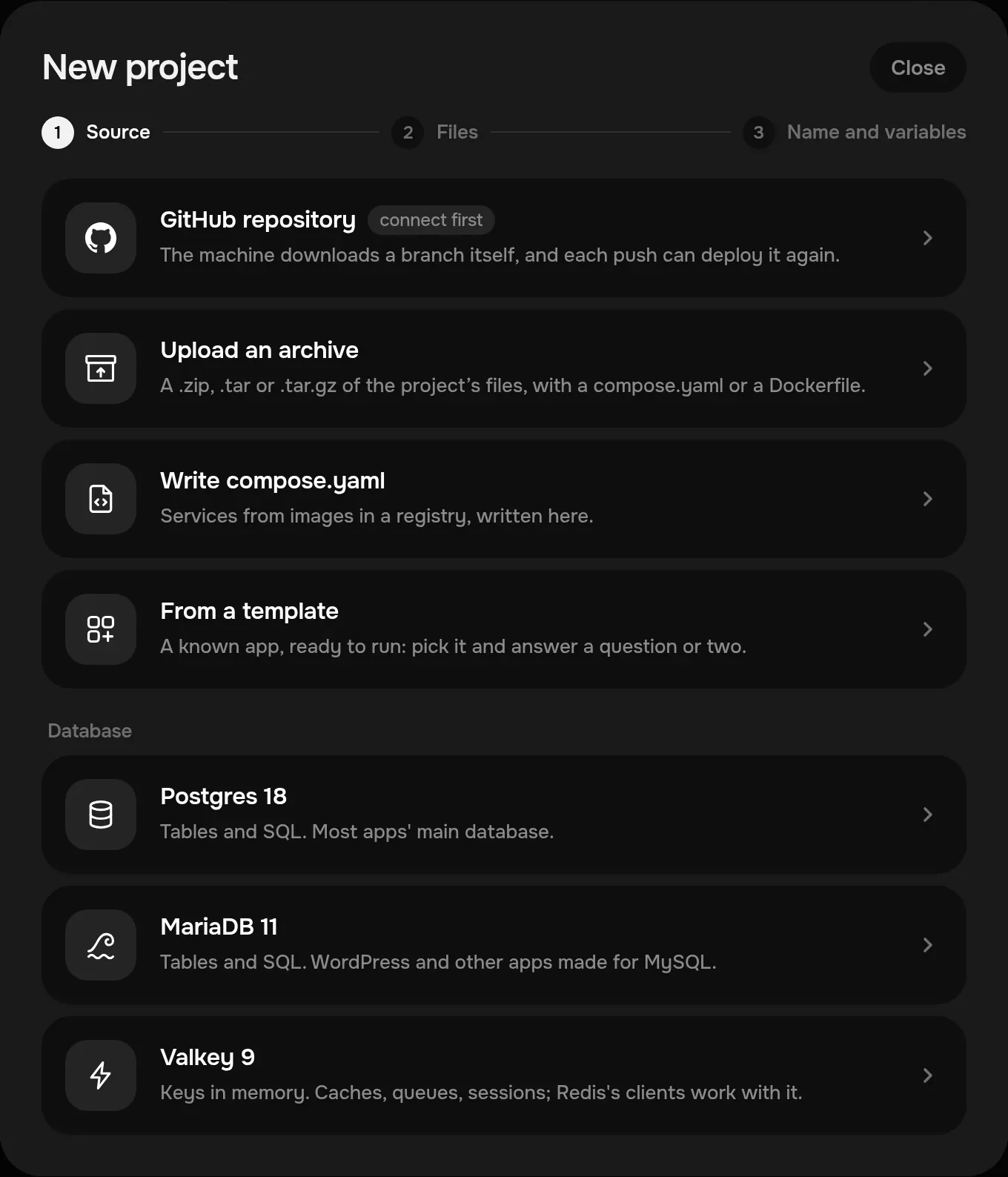
Step 2: Drop an archive, or pick a repository
An archive is a .zip, .tar or .tar.gz of the folder, and the panel says what will run: “Runs its compose.yaml.” A repository is one of your own GitHub account's, with its Branch and Directory in the repository; Install on more repositories lets Pethost's GitHub App read it. Then Next.
Step 3: Check the variables, then Create project
Environment variables is the project's .env: an archive's own fills it, and for a repository, which seldom holds one, you type its lines. Create project deploys it.
redis healthy and web running, its address, and its requests of the last day.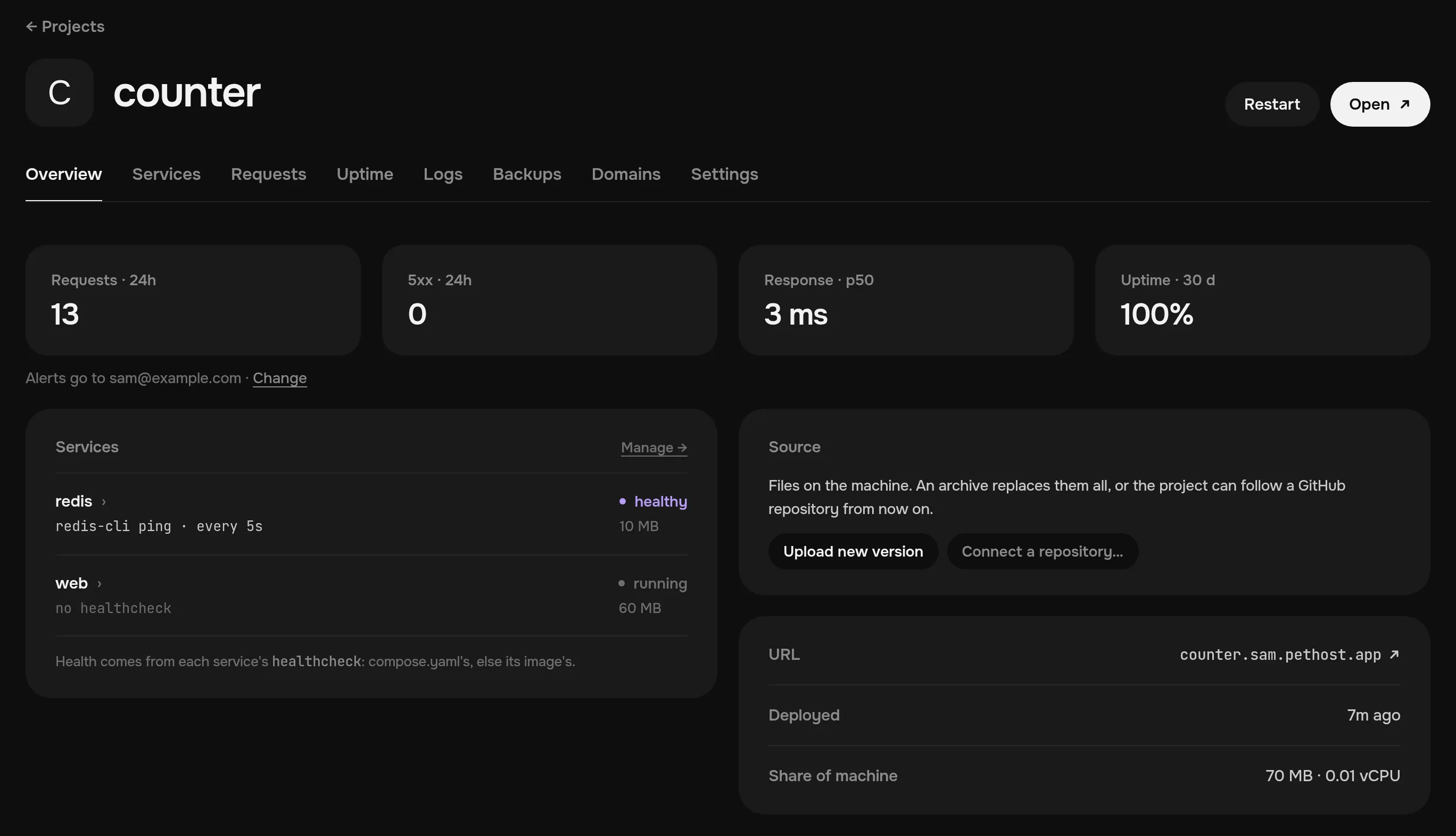
Deploy it with your AI agent
Step 1: Install the Pethost plugin
Tell your agent: “Install the Pethost plugin from https://github.com/pethost-dev/plugin for yourself.” You approve it in your browser. The plugin's page has the command for Claude Code, Codex, Cursor and others.
Step 2: Ask for the deploy
You say: Deploy this Compose app and send me the link.
- GetMachine sam.pethost.app, no project counter yet
- CreateTransfer counter.tgz uploaded
- CreateProject counter: succeeded
The agent answers: It's live at https://counter.sam.pethost.app. Your compose.yaml ran as written.
The agent sends the folder as it is, and fixes what a refusal names: how an agent deploys a project.
Which service gets the public address?
Pethost keeps ports: as you wrote it, and asks each published TCP port what it is:
- A port that answers HTTP gets an HTTPS address and is not opened on the machine:
"${APP_PORT}:5000", 8000:5000 here, became https://counter.sam.pethost.app, sent to port 5000 ofweb. Where several services answer HTTP, each gets<project>-<service>.sam.pethost.app. - Any other published port opens on the machine as written, to anyone.
"6379:6379"underrediswould put Redis on the internet: leave it out, or bind it to 127.0.0.1, which is never opened.pethost tunnel redisreaches it either way. - A service with no
ports:is private: the project's services reach it atredis:6379.
To send a path to another service, say an api beside web, write routes under x-pethost. port is the port in the container, 5000, not 8000:
x-pethost:
  routes:
    - {host: counter.sam.pethost.app, service: web, port: 5000}
    - {host: counter.sam.pethost.app, path: /api, service: api, port: 8000, strip_path: true}
The file's x-pethost counts at the first deploy; later ones keep the project's, so change routes on the Domains tab or with pethost domain add hits.sam.pethost.app. A domain you own is one DNS record: give an app a custom domain.
Where does the data live?
In named volumes. Whatever else a container writes is lost when it is made anew, by a deploy that changes its service or by pethost restart --pull. The quickstart's step 5 mounts a volume. That file, with step 3's healthcheck, ran as written:
  redis:
    image: redis:alpine
    volumes:
      - redis-data:/data

volumes:
  redis-data:
The deploy that added it started the count over, as Redis moved to the empty volume. Since then it goes on, in a new container too:
$ pethost restart --pull redis
counter (.pethost)
✓ redis runs in a new container, on the newest image of its tag, in 6 s.
$ curl https://counter.sam.pethost.app/
Hello from Pethost! I have been seen 4 time(s).
Every deploy and rollback keeps the volume, and nightly backups hold it, off the machine, for 14 days: pethost backup restore <id> --volume redis-data puts it back. A bind mount of a folder without :ro, ./data:/data, gets the project's volume data, not your folder's files.
Environment variables and secrets
The folder's .env goes with the first deploy only; after that the project keeps its own, and a deploy does not replace it. It fills each ${…} in compose.yaml, and a service gets a variable only where compose.yaml passes it:
$ pethost env
counter (.pethost)
APP_PORT     no service reads it
REDIS_HOST   web
REDIS_PORT   web
Their values:  pethost env --show

$ pethost env set SECRET_KEY
counter (.pethost)
SECRET_KEY: ••••••••
✓ /.env has SECRET_KEY now. Deployed in 1 s.
A bare name asks for the value without showing it. web reads SECRET_KEY once compose.yaml passes it, as - SECRET_KEY=${SECRET_KEY} under environment:, or env_file: .env for every variable. After pethost deploy:
$ pethost env
counter (.pethost)
APP_PORT     no service reads it
REDIS_HOST   web
REDIS_PORT   web
SECRET_KEY   web
Their values:  pethost env --show
pethost env push sends the folder's .env again, after naming what would go. A literal $ in compose.yaml is written $$. An email provider's key goes in the same way: send email from your app.
Deploy a new version, and roll back
Change the code and run the same command. The build's layers stay on the machine, so it took 3 seconds:
$ pethost deploy
counter (.pethost)
✓ Packed 7 files · uploaded · built and started in 3 s
  · kept the project's .env in place of the version's own: after the first deploy the project's is kept
  · kept the project's x-pethost
  It answers 200.
https://counter.sam.pethost.app
To send this folder's .env:  pethost env push
Your machine keeps the files of the three versions before the current one:
$ pethost rollback
counter (.pethost)
✓ Back on the version deployed today at 20:38, in 3 s.
  /.env, the routes and the volumes' data stay as they are now.
  This folder is as it was: the next pethost deploy puts its code online again.
pethost rollback --list shows the versions. To deploy every push instead, connect the repository once; a rollback then goes to a commit and stops following the branch until you run pethost github again:
pethost github sam/counter # from now on, every push deploys itselfRun a database next to your app
A database service in compose.yaml, as redis here, runs as written, its data in a volume backed up with the project. Or make a one-click database, a project of its own: + New lists Postgres, MariaDB and Valkey, which Redis's clients work with. It comes with a data editor in the browser and backups of its own.
Linked at the app's create (CreateDatabase, then link_databases), the machine writes DATABASE_URL and its parts into the app's .env, so no password is copied. The app reaches it at the database's project id: Postgres in one click.
What compose.yaml features are not supported?
Few. The quickstart's last version, with include: ./infra.yaml and develop: watch, ran as written.
| In compose.yaml | On Pethost | Write instead |
|---|---|---|
.:/code, the project mounted writable | Refused | .:/code:ro |
privileged, cap_add, devices, host networking, the Docker socket | Refused: they could reach the machine | Nothing |
| More than one replica | Refused | One container a service |
A volume's name, driver or external | Refused | The volume's key alone |
A volume with no name, - /data | Refused: no backup holds it | data:/data |
include or extends from a URL, a git URL as build context | Refused | The file in the folder |
develop: watch | Accepted, unused online | pethost deploy |
| compose.override.yaml | Left out | Its lines in compose.yaml |
Where your compose.yaml is made for a laptop, keep it and write pethost.compose.yaml beside it: Pethost takes that file first. Every rule is in the API reference.
When a deploy fails
The file is refused. Each line with a cross names the place and what to write, and nothing changes on the machine:
$ pethost deploy
counter (.pethost)
  · kept the project's .env in place of the version's own: after the first deploy the project's is kept
  · kept the project's x-pethost
✗ services.web.volumes[0]: the bind mount at /code is of the project's whole directory and writable, but a deploy replaces the project's files: add :ro, and keep data in a folder of its own, e.g. ./data:/data
Nothing was deployed. Change that in the folder, then run pethost deploy again.- A service exits or turns unhealthy. The deploy fails, its log ending with that service's last 20 lines:
pethost logs --deploy.pethost whyshows what is wrong. - The address answers 502. Nothing listens on the routed port, or only at 127.0.0.1, which the proxy cannot reach. That is why the quickstart's Dockerfile sets
FLASK_RUN_HOST=0.0.0.0. - A port is taken. A published port that is not HTTP and that another project holds fails the deploy: change the number left of the colon.
- An image declares a VOLUME nothing mounts. Mount a named volume there.
Questions
Can I deploy a docker-compose.yml file?
Yes. Pethost takes compose.yaml, compose.yml, docker-compose.yml or docker-compose.yaml at the folder's root, and pethost.compose.yaml before any of them. Override files are left out.
Do I need to change my compose file for Pethost?
Usually not: Docker's Compose quickstart ran unchanged. A file Pethost will not run is refused before anything starts, saying what to write instead.
How do I add a custom domain to a Compose app?
Run pethost domain add www.example.com in the project's folder. It prints one DNS record to make, and the certificate comes by itself once the name resolves: the custom domain guide.
How much does Docker Compose hosting cost on Pethost?
Starter is €9.99 a month for 2 vCPU, 3 GB of memory and 30 GB of SSD, for as many projects as fit; Grow is €17.99 for twice that. Nothing is metered. There is no free tier, and prices are without VAT: the plans.
The screens are deploys of Docker's Compose quickstart, read on 29 October 2026, on a test machine of ours. Other hosts that take a Compose file: managed Docker Compose hosting in 2026.
Run your apps on Pethost
Deploy apps, bots and databases from your agent, GitHub or the browser, as many as fit, at one flat price. Nothing metered, nothing billed on top.